
If you’ve been stressing about whether your photography website is “optimized for AI search,” take a breath. On May 15, 2026, Google quietly published its first-ever official guide on how to optimize for generative AI features in Search — and the biggest takeaway might surprise you: almost everything the SEO industry has been selling you about AI optimization is unnecessary.
This post breaks down exactly what Google said, cuts through the noise, and translates it into plain, practical advice for photographers who want their websites to show up when potential clients are searching online.
Since Google launched AI Overviews in 2024 and AI Mode in early 2026, a flood of “AI optimization” advice has taken over the SEO world. Consultants started recommending photographers create special files for AI bots (called llms.txt), restructure their blog posts into short robot-friendly “chunks,” add experimental code to their pages, and rewrite all their content in stiff, definition-heavy language that supposedly reads better to machines.
The result? Photographers and small business owners started wasting time and money on tactics that had no basis in how Google’s systems actually work.
Google published this guide because too many website owners were doing counterproductive things. The documentation is unusually blunt — using phrases like “not needed” and “you don’t need to” throughout. That level of directness is rare from a company known for vague non-answers.
For photographers, this is great news. It means you haven’t fallen behind. And if you’ve already been doing solid SEO work on your photography site, you’re in much better shape than you probably think.
Here’s the most important line from the entire guide, word for word:
“From Google Search’s perspective, optimizing for generative AI search is optimizing for the search experience, and thus still SEO.”
You may have heard the terms AEO (Answer Engine Optimization) and GEO (Generative Engine Optimization) — buzzwords that agencies have been marketing as brand-new disciplines requiring separate strategies, separate budgets, and separate services.
Google just said, officially, that those are the same thing as SEO.
AI Overviews and AI Mode pull from the same search index, use the same quality signals, and apply the same content standards as traditional organic search results. There is no secret back door. There is no separate AI database you need to get listed in. If your website ranks well in regular Google search, you’re already in position to be cited in AI responses.
For photographers, this is a clarifying moment. You don’t need a new strategy. You need to execute your existing one better.
Google was unusually specific about what doesn’t work. These aren’t vague suggestions — they’re direct statements from the documentation.
The llms.txt proposal gained traction as a way to tell AI systems how to read your site, similar to how robots.txt communicates with crawlers. Multiple SEO tools began recommending it as standard practice for any website that wanted AI visibility.
Google’s position: their systems do not look for or use this file when determining what appears in AI Overviews or AI Mode. Creating one has zero confirmed impact on your Google visibility.
As a photographer, this means you don’t need to ask your web developer to add special AI-readability files to your site. That’s time and money better spent elsewhere.
The content chunking theory proposed that pages needed to be broken into short, self-contained segments with headers at precise intervals — all designed to make it easier for AI models to extract information.
Google says their systems handle content parsing internally. You don’t need to restructure how you write your blog posts, about page, or service descriptions. In fact, artificially breaking up naturally flowing content can hurt both readability and traditional SEO performance.
Write the way you naturally communicate with potential clients. Google’s AI is sophisticated enough to understand it.
Schema markup (the code that helps Google understand your content) has been a solid SEO practice for years. But some consultants started recommending experimental, AI-specific schema types as a shortcut to appearing in AI Overviews.
Google’s documentation is clear: no new schema types are needed. Standard structured data — the kind a good photographer website already uses for things like local business information, reviews, and FAQ sections — still helps with traditional rich results, but it’s not a special key to AI features.
Keep your existing schema clean and accurate. Don’t add experimental code chasing AI placement.
This might be the most damaging trend the guide addresses. In 2025, a writing style emerged in the SEO world: short declarative sentences, robotic tone, excessive bullet points, and personality stripped away — all in the name of making content easier for AI to process.
Google’s stance is direct: write for humans. Their AI systems are sophisticated enough to parse natural language, nuance, personal voice, and complex storytelling. Dumbing down your content hurts user experience and damages the quality signals Google evaluates.
This matters enormously for photographers. Your voice, your personality, your storytelling — the way you describe what it feels like to photograph a newborn session or capture a family’s first moments together — that is not a liability. It’s an asset. Don’t strip it out trying to sound like a glossary entry.
With the noise cleared, Google’s positive recommendations come down to three pillars. None of them are new — but all three are now officially confirmed as the signals that matter for AI features.
Google’s language around “valuable, non-commodity content” is their E-E-A-T (Experience, Expertise, Authoritativeness, Trustworthiness) framework applied directly to AI features. The guide emphasizes original research, proprietary insights, expert perspective, and real-world experience as what AI Overviews preferentially cite.
The logic is simple: AI systems already “know” generic information. What they surface to users is content that adds something the model cannot generate on its own.
What this looks like for photographers:
Your content should reflect things only you can say. Not “here are 5 tips for your newborn session” recycled from a dozen other websites — but the specific things you’ve learned after photographing hundreds of newborns. Your honest perspective on why you use natural light instead of studio lighting. The real story behind a session that challenged you and what it taught you. Your specific approach to putting a nervous mom at ease. The behind-the-scenes reality of what makes a cake smash session actually work.
That kind of content cannot be replicated by a competitor copying your ideas. It’s uniquely yours, and Google’s AI wants to cite exactly that.
Blog posts, detailed FAQ pages, client education articles, and behind-the-scenes content written from genuine expertise are all opportunities to build this kind of authority.
AI Overviews increasingly incorporate images, videos, and visual elements in their responses — not just text. Google’s guide emphasizes that multimodal content is a confirmed signal for AI feature visibility.
What this looks like for photographers:
You’re already ahead of most industries here. Photography is a visual medium, and you have original imagery no one else has. But there’s a difference between posting portfolio photos and using visual content strategically:
Stock photos mean nothing here. Original, contextually meaningful visuals tied to real experience are what Google rewards.
The less exciting truth: crawlability, site speed, mobile-friendliness, proper indexation, and clean URL structures are still the foundation of everything. Google’s AI features don’t have a workaround for technical problems — if your site is hard for Google to access and understand, it won’t appear in AI results regardless of how good your content is.
Technical checklist from the guide:
If you’re on WordPress and haven’t run a technical audit recently, plugins like Rank Math or Yoast SEO can surface many of these issues quickly. A fast, accessible, well-structured photography website is still the prerequisite for everything else.
Understanding the mechanics helps explain why foundational SEO keeps working:
RAG (Retrieval-Augmented Generation): When someone asks Google’s AI a question, it doesn’t just generate a response from its training data. It searches the live web using its core Search ranking systems, retrieves relevant pages from its index, and uses those real pages to generate its response — with clickable links back to those sources. This means your website has to be in Google’s index and ranking well to be cited.
Query Fan-Out: The AI automatically generates multiple related searches to answer a user’s question more completely. If someone asks “what should I wear for a newborn photo session,” Google’s system might also search for “newborn session preparation tips,” “colors that photograph well for newborns,” and “what to expect at a newborn photography studio.” If your website has content covering these related angles, you have more opportunities to be cited across a broader set of AI responses.
This is why photographers who write comprehensive, experience-based content across multiple aspects of their specialty — the preparation, the session itself, the delivery, the emotions involved — naturally build more AI visibility than those with a simple five-page website.
Based on everything Google’s guide confirms, here are the highest-leverage actions for a photography website:
Audit your existing content. Look at your blog posts, your service pages, your about page. Does any of it sound generic — like it could have been written by anyone? Those pages are the lowest priority for Google’s AI. Start identifying where you can add genuine, first-person perspective and specific experience.
Write one experience-based article. Pick something you know deeply — how you handle a fussy newborn, what really makes a maternity session feel comfortable, the truth about what happens when a cake smash doesn’t go as planned. Write it honestly and in detail, the way you’d explain it to a client over coffee. That’s the kind of content Google wants to cite.
Add alt text to your portfolio images. This is a quick technical win that photographers almost universally overlook. Descriptive alt text on every image improves both accessibility and how Google understands your visual content.
Check your site speed on mobile. Open Google PageSpeed Insights (free tool), enter your URL, and look at your mobile score. A photography website with large unoptimized images is one of the most common technical problems in this industry — and one of the easiest to fix.
Don’t waste time on llms.txt, chunking, or AI rewriting. Google told you directly these don’t matter for their search features. Redirect that time toward the three pillars that do.
Google’s AI optimization guide is ultimately a message that good photography websites — built with real content, genuine expertise, and solid technical foundations — are already aligned with how AI search works. The industry noise about special AI tactics was just that: noise.
Your photography business has something that no AI can replicate: real sessions, real clients, real results, and a unique visual point of view built over years of work. That’s not just your brand — according to Google’s own documentation, it’s exactly the kind of content their AI search features are designed to surface.
Keep showing up as yourself. Write about what you actually know. Keep your site technically healthy. That’s the strategy — and it always has been.







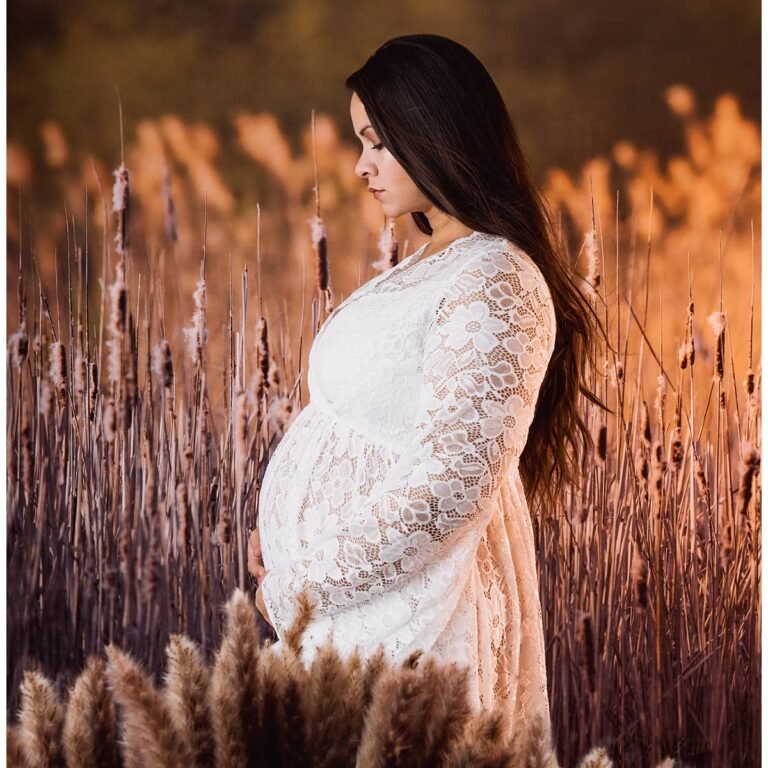










Maternity, Newborn, Children Photographer In Jacksonville. Serving Jacksonville, Orange Park. Ponte Vedra and North East FL areas.